
July 21, 2026 · 9 min read
Offline-First React PWA with TanStack Query: A Practical Guide
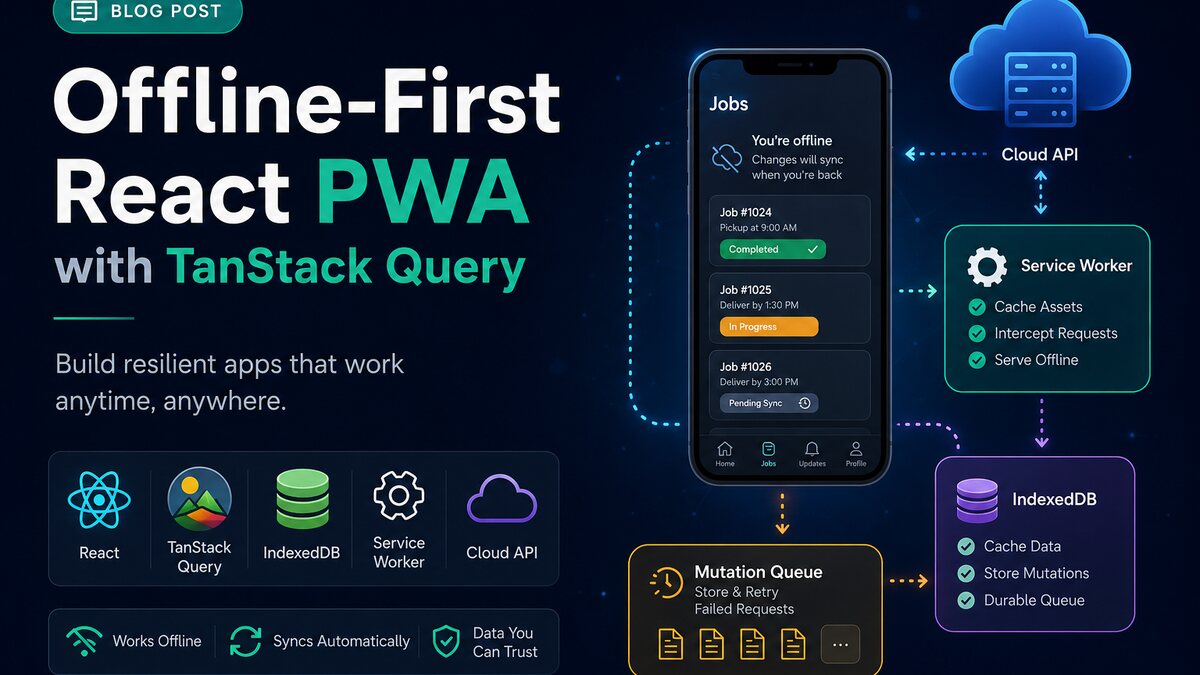
An offline-first React PWA with TanStack Query needs more than a service worker and a cached home screen. A logistics user may open a job, change its status, lose mobile coverage, and reconnect later. If the interface says the update succeeded but the server never receives it, the app has created a business problem.
I work on Apex Logistics, a truck-driver job marketplace and shipper quote platform used across the GCC. It is built with React 19, TanStack Start, TanStack Query, TypeScript, Firestore, and progressive web app features. That context shapes my view: offline support should protect important workflows, make state visible, and recover predictably.
This guide explains the architecture I use to reason about offline reads, queued writes, synchronization, conflicts, authentication, and testing. The decisions apply to field-service, delivery, inspection, and other React applications used on unreliable connections.
What offline-first means in a React PWA
Offline-first means the application can provide a useful, honest experience when the network is slow or unavailable. It does not mean copying the entire backend into the browser. I divide the problem into three layers.
- Application shell: the HTML, JavaScript, CSS, icons, and offline fallback needed to open the interface.
- Readable data: previously fetched jobs, routes, profiles, or reference data that users may need again.
- Pending writes: status changes and other actions that must be stored locally and synchronized safely.
A service worker can intercept requests and serve cached assets. TanStack Query handles server-state fetching, freshness, retries, and in-memory caching. A persistence layer can restore selected query data after a refresh. IndexedDB is better for structured offline data and durable mutation queues than localStorage, which is synchronous and limited to strings.
These tools have different jobs. A service worker does not know whether a status mutation is still valid. TanStack Query does not design a conflict policy. IndexedDB stores records but does not decide when to replay them. A reliable offline-first React PWA connects them through explicit product rules.
Design the offline contract before writing code
I start by listing what users can see and do when online, slow, newly offline, and offline after reopening the app. That exposes assumptions easily missed during normal development.
Choose the workflows that must survive
For a logistics product, reading an assigned job may be essential. Updating an arrival status may also need to work offline. Searching every load across the network probably does not. A quote based on current capacity may require a live response.
Classify each feature as read-only offline, writable offline, or online-only. Disable an online-only action with an explanation. Label cached information with its last sync time. Mark queued changes as pending instead of confirmed.
Define the source of truth
The server remains the source of truth for shared business data. Every queued mutation should have a client-generated identifier, creation time, user or tenant scope, operation type, payload, retry count, and status. This makes duplicate prevention and debugging possible.
Decide how long local data remains usable. A driver may reopen today's assigned job after hours. A marketplace price or permission record may become unsafe sooner. Cache lifetime is a product decision, not a value to copy blindly.
Use TanStack Query for offline-aware server state
TanStack Query exposes query status and fetch status. A query can have useful cached data while its refresh is paused. If the interface only checks whether the query is pending, it can replace good cached content with an endless spinner.
The current documentation provides three network modes. The default online mode pauses network work without a connection. always ignores detected network state. offlineFirst runs the query function once, allowing a service worker or HTTP cache to answer, then pauses retries after a cache miss. I choose per workflow rather than setting one mode everywhere.
const queryClient = new QueryClient({
  defaultOptions: {
    queries: {
      networkMode: 'offlineFirst',
      staleTime: 5 * 60 * 1000,
      retry: 2,
      refetchOnReconnect: true,
    },
    mutations: {
      networkMode: 'online',
      retry: 0,
    },
  },
})
This configuration is only a starting point. A five-minute freshness window may suit stable reference data but not live job availability. Retrying a failed read can be harmless; retrying a non-idempotent write can create duplicates. The API contract must determine the final settings.
Persist only useful query data
TanStack Query's persistence tools can dehydrate successful queries and restore them from a storage persister. For a serious offline workflow, I prefer an asynchronous IndexedDB-backed persister over synchronous local storage. I whitelist the query families that are genuinely useful offline and exclude sensitive, oversized, or rapidly changing responses.
Set a deliberate maxAge and a cache-buster tied to schema or application versions. Without a buster, an old deployment may restore data whose shape no longer matches the current code. Clear tenant-scoped persisted data on logout or account switching. A cache leak between organisations is a security failure even if the server would reject later writes.
Build a durable mutation queue for offline writes
Optimistic UI makes an interface feel immediate by showing the expected result before the server confirms it. It is useful, but it is not durable synchronization. If the browser closes before an in-memory mutation reaches the API, that action disappears.
For each offline-capable write, I store an outbox record in IndexedDB before treating it as queued. The UI reads both server data and local pending changes so the user can see the intended result. When connectivity returns, a sync worker sends records in a controlled order and changes their status only after a valid server response.
Make every write idempotent
An idempotent operation can be safely submitted more than once without creating a second business event. Give each mutation a stable client operation ID and make the server record processed IDs. If a request reaches the server but the response is lost, the retry should return the original result rather than applying the change again.
This matters for actions such as accepting a job, uploading a proof record, or changing a shipment milestone. Do not rely on the browser to know whether the first request succeeded. Design the API so uncertainty is safe.
Separate network failures from rejected writes
A missing connection or temporary server error may be retried. A 400 validation failure, expired permission, or business-rule conflict usually needs user attention. Workbox Background Sync can queue failed requests and replay them later, but its standard failure hook responds to thrown network failures; normal 4xx and 5xx responses need explicit handling if they should enter the retry path.
I use clear queue states such as pending, syncing, blocked, and confirmed. A blocked item remains visible with a reason and a recovery action. Silently retrying a permanently invalid update wastes resources and leaves users believing their work will eventually appear.
Handle reconnects, conflicts, and browser limits honestly
The browser's online signal is a hint, not proof that the API is reachable. A device can connect to Wi-Fi behind a captive portal or regain a weak signal that drops immediately. On reconnect, use a lightweight API request, then drain the queue with backoff rather than sending every mutation at once.
Ordering also matters. A status update that depends on accepting a job must not run first. I record dependencies or serialize related operations by entity. Independent jobs can sync concurrently within a small limit.
Choose a conflict rule per field
“Last write wins” is simple but can overwrite newer work from another user. It may be acceptable for a personal note, but it is risky for assignment, price, or workflow status. Include a server version or update timestamp with the mutation. If the stored version is stale, the API can reject the update and return the current record.
The interface can then offer a controlled resolution: keep the server value, review both versions, or reapply an allowed field. There is no universal conflict algorithm. The correct choice depends on the business meaning of the data.
Do not depend only on Background Sync
The Background Synchronization API can ask a service worker to retry work after connectivity returns, even when the page is no longer open. However, MDN marks it as limited availability. Workbox provides a fallback that retries when the service worker starts, but I still trigger synchronization when the app launches, becomes visible, and detects a usable connection.
This layered approach is less elegant than trusting one browser feature, but it works across more real devices. Keep the queue visible so users can reopen the app and understand whether their actions were confirmed.
Security and testing for an offline-first React PWA
Offline storage expands the amount of business data held on a device. Store the minimum fields required for the supported workflow. Do not persist access tokens longer than necessary, never put privileged server credentials in the client, and clear scoped caches on logout. The server must recheck authentication, tenant membership, permissions, and validation when queued mutations arrive.
A mutation created while the user was authorised may be replayed after their role changes. The server's current rules win. The client should move the rejected item to a blocked state and explain that access changed rather than retrying forever.
I test offline behaviour as a sequence, not a single DevTools checkbox:
- Load the app online and confirm the intended data is persisted.
- Go offline, refresh, and verify that the application shell and selected records still open.
- Create multiple offline actions, close the tab, and reopen it.
- Reconnect with slow or unstable networking and confirm ordered, duplicate-safe replay.
- Force validation, authentication, permission, and version conflicts.
- Deploy a schema change and verify that cache busting prevents broken restoration.
- Test the actual mobile browsers and installation paths used by the audience.
Watch the queue and server logs during these tests. Useful production telemetry includes queue age, retry count, conflict type, last successful sync, and the client operation ID. Avoid logging sensitive payloads. The goal is to diagnose why an action is stuck without exposing customer information.
The practical takeaway
The best offline-first architecture is usually smaller than the first design. Cache the application shell, persist only the server data users truly need, and make a short list of high-value writes durable. Give every mutation an idempotency key, distinguish retryable failures from business rejections, and show pending state honestly.
That is the approach I apply to PWA work around Apex Logistics: connectivity is treated as an unreliable dependency, not as a binary browser flag. TanStack Query is excellent for coordinating server state, but the product still needs a durable outbox, a server-side duplicate strategy, and explicit conflict rules.
For current implementation details, use the official TanStack Query network-mode guide, Workbox Background Sync documentation, and web.dev offline-data guide. If you need a React PWA that stays useful on unreliable networks without hiding failed business actions, contact me.
Written by Muhammad Mustafa — Full-Stack SaaS Engineer
Get in touch