
July 16, 2026 · 5 min read
Stripe Per-Seat Billing: What Actually Breaks
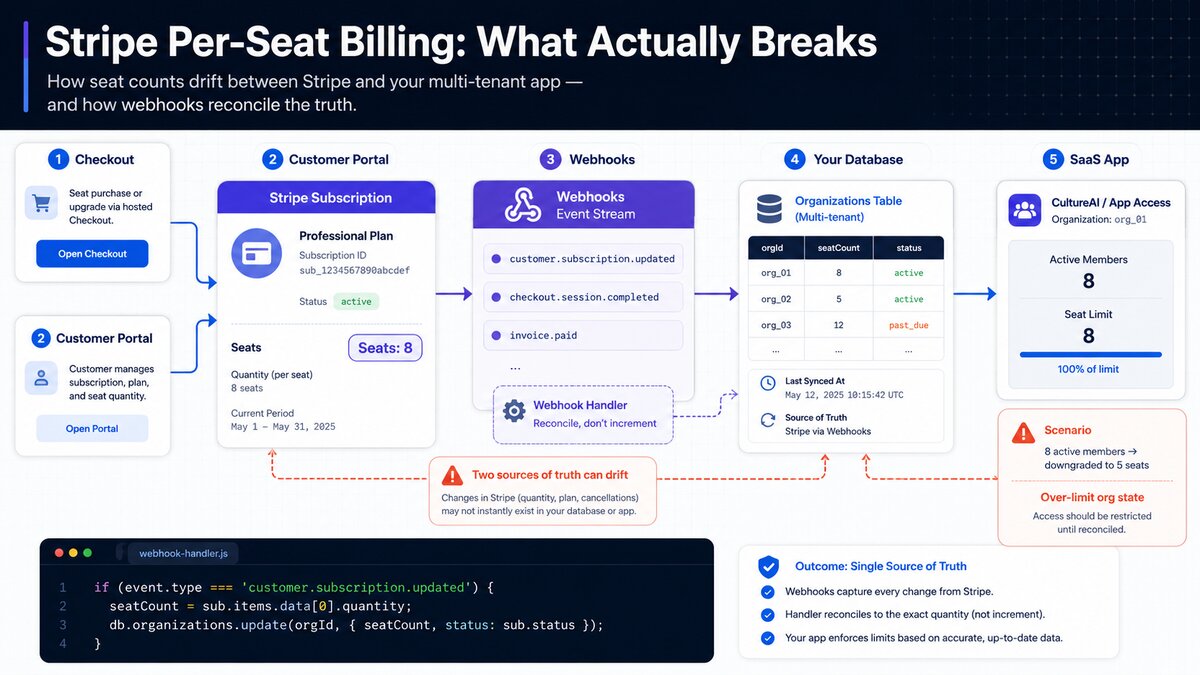
Per-seat billing sounds simple until you actually build it. You charge per active user, Stripe handles the math, done — except the seat count in Stripe and the seat count in your database are two separate sources of truth the moment a webhook is late, a request fails halfway, or someone changes their plan from the Stripe customer portal instead of your app. I ran into all three building CultureAI's billing, and most of the pain wasn't Stripe's API — it was assuming the two systems would always agree.
This is what I'd tell myself before starting, if I could.
The four pieces you actually need
A working per-seat billing setup for a multi-tenant SaaS comes down to four components, and skipping any one of them is where teams get hurt:
- Checkout — where a new org starts a subscription and picks (or gets defaulted to) a seat count
- Customer Portal — Stripe's hosted page for self-service plan/seat changes, so you're not building your own billing UI from scratch
- Webhooks — the only reliable way to know a subscription actually changed
- Your database — the thing your app actually checks before letting a new member in
The mistake I made early on was treating the first two as the source of truth and the webhook as an afterthought. It's backwards. Stripe's own guidance is blunt about this: webhooks are truth, not client-side success callbacks. If your checkout redirect says "success" but the webhook hasn't landed yet, your database doesn't actually know that yet — and if you let the user in based on the redirect alone, you'll eventually have orgs with active access and no matching subscription.
Where seat counts actually get out of sync
The scenario that broke things for us wasn't a failed payment — it was totally legitimate seat changes happening in a place we weren't watching. A team admin can go into the Stripe customer portal and change quantity directly, completely bypassing your app's "invite a teammate" flow. If your database only updates seat count when someone hits your own invite endpoint, that admin-initiated change silently drifts your internal count away from what Stripe actually has on file.
The fix is to stop thinking of "add a seat" as an action your app performs, and start thinking of it as a state your webhook handler reconciles. Every seat-relevant webhook event should overwrite your stored seat count with whatever Stripe says it is now — not increment or decrement based on what you think happened.
// Simplified: reconcile, don't increment
app.post('/webhooks/stripe', async (req, res) => {
  const event = stripe.webhooks.constructEvent(
    req.body, req.headers['stripe-signature'], webhookSecret
  );

  if (event.type === 'customer.subscription.updated') {
    const sub = event.data.object;
    const orgId = sub.metadata.orgId; // set this at checkout time
    const seatCount = sub.items.data[0].quantity;

    // Overwrite, don't adjust — Stripe's number always wins
    await db.organizations.update(orgId, { seatCount, status: sub.status });
  }

  res.json({ received: true }); // respond fast, process idempotently
});
Two details in that handler matter more than they look. First, storing your internal orgId in the subscription's metadata at checkout time is what makes the webhook payload self-contained — you don't have to do a separate lookup by Stripe customer ID under load. Second, returning a 2xx quickly and doing any slow work asynchronously matters, because Stripe will retry an event that times out, and now you're handling the same seat change twice.
The invalid state nobody designs for upfront
The other place this bites: what happens when someone tries to reduce seats below the number of people actually using the product? If an org has 8 active members and someone drops the subscription to 5 seats from the Stripe portal, you now have an org that's over its own limit. Stripe doesn't know or care about your "active members" concept — that check has to live in your app.
The practical answer is to treat your stored member count as a floor. Before letting a seat reduction take effect, or immediately after a webhook reports one, check it against actual active members and handle the gap explicitly — either block the downgrade in your UI before it reaches Stripe, or (if it already happened) flag the org and prompt an admin to remove members rather than silently locking people out.
What I'd do differently
If I were starting CultureAI's billing today, I'd build the reconciliation webhook handler before I built the checkout flow, not after. It's tempting to build the part users see first — pick a plan, enter a card, done — and treat webhook handling as plumbing to fill in later. But the checkout flow only runs once per org. The webhook handler runs for the entire lifetime of every subscription, including all the messy edge cases: failed renewals, mid-cycle plan changes, seat changes from three different places, cancellations that still have days left on the current period. That code carries more of the actual product than the checkout page does.
The other change: log every webhook payload before you process it, even in production, even though it feels excessive. The one time a customer disputes their seat count, having the raw event Stripe actually sent — not your interpretation of it — is the difference between a five-minute investigation and a guessing game.
Per-seat billing is one of the more approachable Stripe integrations to start, and one of the easier ones to get subtly wrong once real teams start using the self-service portal instead of your app's UI. Build the reconciliation logic like Stripe's number is always right, because it is.
Written by Muhammad Mustafa — Full-Stack SaaS Engineer
Get in touch